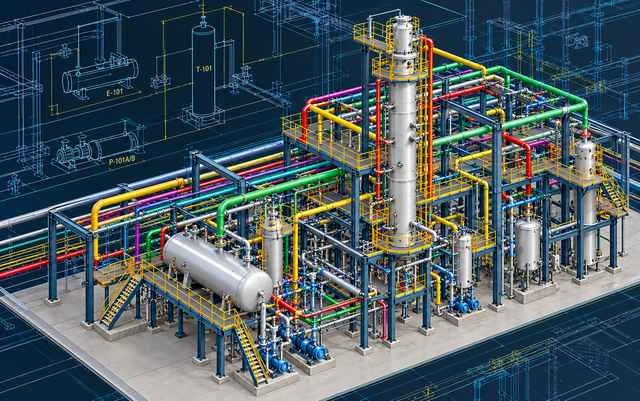
Develop your industrial plant design skills with SP3D training at CADDESK Marathahalli, Bangalore. Learn the fundamentals of 3D plant modelling, piping layout, equipment placement and engineering design coordination.
Talk to a counsellor today and unlock your CAD career path.
By submitting, you agree to receive a callback from our team.
The SP3D course at CADDESK Marathahalli is intended for learners who want to understand specialized software workflows used in industrial plant design. SP3D, commonly associated with SmartPlant 3D and Hexagon’s Smart 3D plant design technology, supports the development of intelligent three-dimensional models for industrial facilities. These models can contain information about equipment, piping, structural components and other plant elements, helping engineering teams coordinate their designs and prepare project documentation. During training, learners can explore the software environment, understand project organization and become familiar with the basic workflow for developing plant models. Depending on the syllabus, topics may include equipment placement, piping routes, component properties, model navigation, structural elements, drawing deliverables and coordination practices. Practical exercises can help learners understand how individual design elements fit into a larger plant model and how accurate modelling contributes to clear engineering documentation. SP3D training may be relevant to mechanical engineering graduates, piping design aspirants, plant design learners and professionals who want to expand their knowledge of industrial engineering software. As SP3D is a specialized application, learners should confirm the prerequisites, software version and exact modules covered before enrolling. Contact CADDESK to check the current syllabus, course duration, fees, available training modes and practical project details.
Training Excellence
40 Days
15+ Live Projects
Latest SP3D
ISO Certificate
100%
Offline + Online
Introduction to SmartPlant 3D / Smart 3D
Overview of industrial plant design
Understanding the user interface
Project structure and modelling environment
Introduction to intelligent 3D models
Model navigation and viewing tools
Introduction to plant equipment
Equipment placement and orientation
Understanding equipment properties
Positioning equipment within a plant layout
Working with equipment connections and nozzles
Basic model editing and review
Introduction to industrial piping systems
Piping layout and routing concepts
Working with pipes, fittings and valves
Understanding piping components and properties
Connecting pipes to equipment
Reviewing routes and spatial clearances
Basic piping model modification
Introduction to piping specifications
Understanding component selection
Pipe sizes and component properties
Working with project-defined piping data
Maintaining model consistency
Understanding the relationship between components and specifications
Introduction to plant structures
Understanding structural elements
Structural layout and placement concepts
Coordination between structures and piping
Reviewing spatial relationships
Basic model coordination
Navigating and reviewing plant models
Understanding model organization
Identifying spatial conflicts
Reviewing component placement
Coordination between design disciplines
Understanding model updates and revisions
Introduction to plant design deliverables
Understanding drawing and report workflows
Reviewing model information
Preparing documentation as supported by the software setup
Basic drawing review and checking
Engineering data and revision awareness
Exploring a sample plant project
Placing equipment in a model
Developing sample piping routes
Reviewing component properties
Checking the model arrangement
Understanding coordination and documentation workflows


₹4– 6 LPA
₹3 – 6 LPA
₹3 – 5 LPA
₹4 – 7 LPA
₹3 – 6 LPA
₹4 – 8 LPA
Online SP3D training may be a convenient option for learners who want to study specialized plant design software while managing college, work or other commitments. Through instructor-led demonstrations and screen sharing, learners can follow the process of navigating a plant model, positioning equipment, understanding piping routes and reviewing component relationships. Depending on the course structure, online sessions may also include practical exercises and opportunities to discuss modelling questions with a trainer.
Since SP3D is a specialized engineering application, hands-on practice is essential. Learners should confirm how software access will be provided, whether their computer meets the technical requirements and whether the course includes time for guided model development. Practising between sessions can help reinforce concepts such as equipment placement, piping layout, component properties and model coordination.
If you are searching for an SP3D online training centre in Bangalore, contact CADDESK Marathahalli to confirm whether online classes are available for this specific course. Before enrolling, ask about the software version, batch timings, practical assignments, trainer interaction, project guidance and any additional learning resources.
Choosing a training centre is an important step when learning specialized engineering design software. A useful SP3D programme should explain the purpose of the tools, introduce the concepts behind intelligent plant models and provide opportunities to apply those concepts through practical exercises. For SP3D, this may involve understanding equipment placement, piping layouts, component properties, model navigation and coordination between design elements.
CADDESK Marathahalli offers training across CAD and engineering design disciplines. Learners interested in SP3D can enquire about the course syllabus, trainer experience, software availability and practical assignments. It is important to confirm that the course covers the specific design discipline you want to learn, since plant design workflows may vary according to whether the focus is on piping, equipment, structures or broader model coordination.
Before enrolling, ask whether the course includes a sample plant model, guided modelling exercises, model review and engineering documentation workflows. You should also confirm whether learners will receive access to the required software and what support is provided when they encounter modelling issues. These details can help you assess the course based on its actual learning outcomes.
For learners in Marathahalli and nearby areas of Bengaluru, CADDESK is a local training centre to contact about engineering software courses. Reach out to confirm whether SP3D is currently offered, which software version is taught, whether online or classroom batches are available and what certification or career guidance is included.
Learn directly from professionals working on real-time construction and engineering projects.
Every session includes live drafting exercises, software practice, and project implementation.
Dedicated placement assistance with interview preparation and resume building.
Practice using updated SP3D tools and workflows used in the industry.
Weekday batches available for students and working professionals.
Receive industry-recognized certification after course completion.
SP3D, commonly referred to as SmartPlant 3D or Smart 3D, is used for intelligent 3D modelling of industrial plants. Depending on the project setup, it supports workflows involving piping, equipment, structures and associated engineering information.
Mechanical engineering graduates, piping design aspirants, CAD professionals and other learners interested in industrial plant design may benefit. The recommended prerequisites depend on the training programme.
No. They are different plant design applications with different interfaces, project structures and workflows. Both are used in industrial plant design, but the choice of software depends on the employer, project requirements and engineering workflow.
Prior piping or CAD knowledge can be helpful, but entry requirements vary. Contact CADDESK to confirm whether the course is suitable for beginners or intended for learners with previous design experience.
Availability may vary by course and batch. Contact CADDESK Marathahalli to confirm whether SP3D online training is currently offered and how software access is handled.

A typical introductory syllabus may cover model navigation, equipment placement, piping layout, component properties, plant model coordination and engineering documentation. Confirm the exact modules with the training centre.

Depending on your qualifications and experience, SP3D skills may be relevant to plant design, piping modelling, 3D plant design and engineering documentation roles. Completing a course does not guarantee employment.
The duration depends on the course syllabus, batch schedule and practical project work. Contact CADDESK for current duration, fees and timings.
Confirm the certificate type and issuing organization directly with CADDESK. An institute-issued completion certificate is not necessarily an official software-vendor certification.