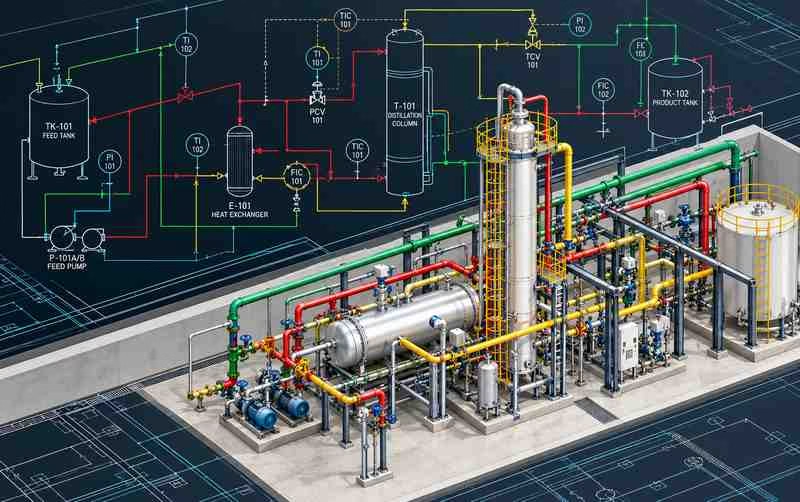
Build your process engineering drafting skills with AutoCAD P&ID training at CADDESK Marathahalli, Bangalore. Learn how piping and instrumentation diagrams represent process equipment, pipelines, valves, instruments and their connections in industrial projects.
Talk to a counsellor today and unlock your CAD career path.
By submitting, you agree to receive a callback from our team.
The AutoCAD P&ID course at CADDESK Marathahalli is intended for learners who want to understand how piping and instrumentation diagrams are prepared and maintained for industrial process systems. P&ID drawings are important engineering documents used to communicate the relationship between process equipment, pipelines, valves, instruments and control components. They help different engineering teams understand how a process system is arranged and how its components relate to one another. During the course, learners can develop an understanding of P&ID terminology, common symbols, drawing organization, equipment identification, line representation and instrumentation tagging. The training can also introduce the process of creating, editing and reviewing diagrams while maintaining consistency in labels, connections and drawing information. These skills are useful for understanding engineering documentation used in sectors such as oil and gas, chemical processing, pharmaceuticals, water treatment, power generation and other process industries. Whether you are a mechanical or chemical engineering student, a piping design aspirant, or a working professional looking to expand your CAD knowledge, learning AutoCAD P&ID can help you understand a specialized area of engineering drafting. Contact CADDESK to confirm the current syllabus, software version, practical exercises, course duration and available training mode.
Training Excellence
40 Days
15+ Live Projects
Latest AutoCAD P&ID
ISO Certificate
100%
Offline + Online
Introduction to process engineering drawings
Difference between process flow diagrams and P&IDs
Purpose and applications of P&ID drawings
Understanding drawing layouts and documentation
Introduction to common P&ID terminology
Process equipment symbols
Pumps, tanks, vessels and heat exchangers
Valves and piping components
Instrumentation symbols
Control valves and measurement instruments
Understanding symbol libraries and legends
Piping line representation
Line identification and numbering concepts
Pipe connections and flow direction
Branch connections and line continuity
Line types and drawing conventions
Organizing piping information in diagrams
Introduction to instrumentation tags
Pressure, temperature, flow and level instruments
Control loops and signal lines
Instrument identification conventions
Control valve representation
Understanding instrument relationships within a process
Understanding the software interface
Creating and editing P&ID drawings
Placing and modifying symbols
Connecting components and piping lines
Assigning component tags and properties
Managing drawing information and annotations
Checking drawing consistency and connectivity
Drawing setup and organization
Text, dimensions and annotations
Drawing layouts and plotting
Equipment and instrument identification
Drawing revisions and documentation practices
Reviewing diagrams for clarity and consistency
Preparing a basic process diagram
Creating a P&ID for a sample process system
Representing equipment and piping connections
Adding valves and instrumentation
Reviewing tags, connections and drawing presentation
Completing a sample P&ID drawing exercise


₹4– 6 LPA
₹3 – 6 LPA
₹3 – 5 LPA
₹4 – 7 LPA
₹3 – 6 LPA
₹4 – 8 LPA
An online AutoCAD P&ID course can be a convenient option for students and working professionals who want to develop specialized drafting skills without travelling to the training centre for every session. With live instruction, screen sharing and guided software demonstrations, learners can follow the process of creating P&ID drawings, identifying equipment symbols, connecting piping lines and adding instrumentation information. Online learning can also make it easier to revisit concepts and practise drawing exercises between classes, depending on the learning resources provided.
For effective online training, learners should have a suitable computer, a stable internet connection and access to the required software. Regular practice is particularly important because P&ID drafting involves more than memorizing commands; it requires understanding symbols, interpreting technical information and maintaining consistency throughout a drawing. Reviewing sample diagrams and discussing errors with a trainer can help learners gradually improve their accuracy and confidence.
If you are searching for an AutoCAD P&ID online training centre in Bangalore, contact CADDESK Marathahalli to ask whether online classes are available for this specialized course. Confirm the batch schedule, trainer interaction, software access, practice assignments, project guidance and any recordings or study materials included before enrolling.
Choosing a training centre is an important step when learning specialized engineering software. A useful course should explain the purpose of the tools, demonstrate how they are used in technical drawings and provide enough practice for learners to apply the concepts independently. For AutoCAD P&ID, this means understanding process diagrams, equipment symbols, piping connections, instrumentation tags and drawing documentation rather than focusing only on software commands.
CADDESK Marathahalli offers CAD and engineering software training across multiple disciplines, including civil, mechanical, electrical and BIM-related areas. Learners interested in AutoCAD P&ID can enquire about the course structure, trainer experience, sample exercises and opportunities to practise creating process diagrams. Before enrolling, it is worth reviewing whether the curriculum matches your current skill level and career goals.
A suitable training programme should also explain what learners are expected to complete by the end of the course. Ask whether you will practise a complete sample P&ID, receive feedback on drawing accuracy, learn documentation conventions and have access to additional learning support. These details can help you evaluate the course based on its actual learning outcomes rather than broad marketing claims.
CADDESK’s Marathahalli location provides a local option for learners in and around the area who are exploring CAD and engineering design training. Speak with the team to confirm the availability of AutoCAD P&ID, current course fees, batch schedules, software version, certification details and any career support included.
Learn directly from professionals working on real-time construction and engineering projects.
Every session includes live drafting exercises, software practice, and project implementation.
Dedicated placement assistance with interview preparation and resume building.
Practice using updated AutoCAD P&ID tools and workflows used in the industry.
Weekday batches available for students and working professionals.
Receive industry-recognized certification after course completion.
AutoCAD P&ID is used to create and manage piping and instrumentation diagrams for process systems. These diagrams represent equipment, piping, valves, instruments and control relationships in industrial engineering documentation.
Mechanical, chemical and instrumentation engineering students, CAD drafters, piping design aspirants and relevant working professionals may benefit. The recommended entry requirements depend on the course structure.
Yes. General AutoCAD supports a wide range of drafting tasks, while AutoCAD P&ID workflows focus on process diagrams and specialized components such as equipment, piping lines, valves and instrumentation. P&ID tools can also support structured component data and drawing validation.
Basic AutoCAD knowledge can be helpful, especially for learners who are new to technical drafting. Ask CADDESK whether the current course starts with the basics or expects previous CAD experience.
CADDESK advertises online and offline training on its website generally. Contact the Marathahalli branch to confirm whether the AutoCAD P&ID course is currently offered in both modes.
Relevant topics may include P&ID symbols, equipment representation, piping lines, instrumentation tags, control loops, diagram creation, drawing documentation and practical exercises. Confirm the final syllabus with the training centre.
Depending on your qualifications and experience, P&ID skills may be relevant to junior P&ID drafting, process drawing documentation, piping design drafting and instrumentation drafting support roles. The course alone does not guarantee employment.

The duration depends on the syllabus, training schedule and practical work included. Contact CADDESK Marathahalli for the current duration and batch timings.
Certificate type and eligibility should be confirmed directly with CADDESK. Ask whether it is an institute-issued completion certificate or an official Autodesk certification, as these are different credentials.