Civil 3D Training Centre in Bangalore

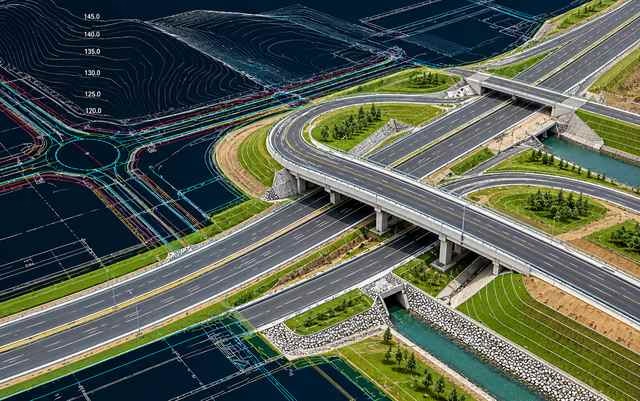
Build your civil engineering design skills with Civil 3D training at CADDESK Marathahalli, Bangalore. Learn how to work with terrain surfaces, alignments, profiles, corridors, grading and civil design drawings using Autodesk Civil 3D. Develop practical knowledge of digital design workflows used in road infrastructure, site development and land engineering projects.

Google-colorCreated with Sketch.
⭐⭐⭐⭐⭐4.9 Rating
ISO Certification
100% Placement Assistance
5000+ Students Trained
100% Practical Training
15+ Years Experience

Book Your Free Demo Class

Talk to a counsellor today and unlock your CAD career path.

By submitting, you agree to receive a callback from our team.

The Civil 3D course at CADDESK Marathahalli is intended for learners who want to understand the software workflows used in civil engineering design and infrastructure projects. Autodesk Civil 3D extends standard CAD drafting with tools for working with engineering objects and design information, including terrain surfaces, alignments, profiles, corridors and grading. These tools can help civil engineering professionals develop coordinated models and drawings for projects such as roads, site developments and land infrastructure.

During the course, learners can explore the Civil 3D interface, understand project data organization and practise working with survey information and terrain surfaces. They can then develop an understanding of alignments, vertical profiles, corridor models, grading concepts and drawing production. These workflows help connect individual design elements into a broader civil engineering model, making it easier to visualize proposed infrastructure and communicate design information.

Civil 3D training may be suitable for civil engineering students, graduates, CAD drafters, site engineers and professionals who want to develop infrastructure design software skills. Practical exercises can help learners understand how terrain data, alignment geometry and corridor components work together. Contact CADDESK to confirm the current syllabus, software version, course duration, fees, training mode and practical project coverage.

15+ Years

Training Excellence

CIVIL 3D Course from Basics to Advanced

Industry Projects
Practical Exercises
Expert Faculty
Autodesk Standards

Your Complete CIVIL 3D Course Learning Journey

Duration

40 Days

Projects

15+ Live Projects

Software

Latest CIVIL 3D

Certification

ISO Certificate

Placement Assistance

100%

Mode

Offline + Online

CIVIL 3D Course Curriculum

Module 1: Introduction to Civil 3D
  • Introduction to Autodesk Civil 3D

  • Overview of the interface and toolspace

  • Drawing setup and project organization

  • Civil 3D objects and workflows

  • Understanding styles and drawing templates

  • Basic data management concepts

  • Introduction to survey data

  • Working with points and point groups

  • Importing survey information

  • Creating terrain surfaces

  • Understanding contours and elevation data

  • Surface editing and boundary management

  • Surface analysis fundamentals

  • Introduction to horizontal alignments

  • Creating alignments from objects

  • Alignment geometry and layout tools

  • Tangents, curves and design elements

  • Alignment labels and annotation

  • Alignment editing and review

  • Creating surface profiles

  • Profile views and design profiles

  • Vertical alignment concepts

  • Grades and vertical curves

  • Profile labels and annotations

  • Reviewing profile geometry

  • Introduction to corridor modelling

  • Understanding assemblies and subassemblies

  • Creating corridor models

  • Baseline and region concepts

  • Corridor surfaces

  • Corridor editing and rebuilding

  • Reviewing corridor geometry

  • Introduction to grading tools

  • Grading objects and feature lines

  • Site grading fundamentals

  • Understanding cut and fill

  • Grading group concepts

  • Surface comparison and earthwork calculations

  • Sample line creation

  • Section views and cross sections

  • Corridor section concepts

  • Section labels and annotation

  • Plan, profile and section drawing layouts

  • Sheet production and plotting

  • Drawing documentation practices

  • Creating a sample terrain surface

  • Developing a horizontal alignment

  • Creating surface and design profiles

  • Building a basic corridor

  • Generating sample sections

  • Reviewing the design model and drawings

Companies That Hire Our Students

Placed Students Through CADDESK Marathahalli Bangalore

Build a Successful Career in Design

Junior Civil 3D Designer

₹4– 6 LPA

Civil CAD Designer

₹3 – 6 LPA

Road Design Drafter

₹3 – 5 LPA

Infrastructure Design Trainee

₹4 – 7 LPA

Site Development Design Assistant

₹3 – 6 LPA

Civil Engineering Drafting Professional

₹4 – 8 LPA

Live + Recorded

Learn at your pace

CIVIL 3D Course Highlights

Live Online Classes
Project-Based Learning
Trainer Support
Flexible Timings
Certification
Placement Assistance

Online CIVIL 3D Course Training Centre in Bangalore

Online Civil 3D training can be a convenient option for learners who want to develop civil engineering design skills while managing college, work or other commitments. Through instructor-led demonstrations and screen sharing, learners can follow the process of creating terrain surfaces, developing alignments, building profiles and modelling corridors. Depending on the course structure, sessions may also include guided assignments and opportunities to ask questions about design workflows.

Because Civil 3D uses connected engineering objects, regular hands-on practice is important. Learners should have a suitable computer, a stable internet connection and access to the required software. Practising between sessions can help reinforce concepts such as surface management, profile design, corridor construction, grading and section generation. Working through a sample project from beginning to end can also help learners understand how the different tools fit together.

If you are searching for a Civil 3D online training centre in Bangalore, contact CADDESK Marathahalli to confirm whether online batches are currently available for this course. Ask about the software version, batch timings, practical assignments, project guidance and any additional learning resources before enrolling.

Why CADDESK Bangalore Is the Best CIVIL 3D Course Training Institute?

Choosing a training centre is an important step when learning civil engineering design software. A useful Civil 3D course should explain the purpose of the tools, demonstrate how engineering objects work and give learners opportunities to apply their knowledge through practical exercises. For Civil 3D, this may involve creating surfaces, developing alignments and profiles, building corridors, working with grading tools and preparing civil engineering drawings.

CADDESK Marathahalli offers training across CAD and engineering design disciplines. Learners interested in Civil 3D can enquire about the syllabus, trainer experience, software availability and practical assignments. It is worth checking whether the course includes a complete sample infrastructure project and whether learners practise generating profiles, corridors and cross sections as part of the programme.

Before enrolling, ask how the trainer reviews drawing accuracy, explains design-object relationships and helps learners troubleshoot modelling issues. Confirm whether the course covers road design, site grading or other specific civil engineering workflows that match your goals. These details can help you evaluate the programme based on its actual learning outcomes.

For learners in Marathahalli and nearby areas of Bengaluru, CADDESK is a local centre to contact about civil engineering software training. Speak with the team to confirm the current Civil 3D batch, software version, available training modes, fees, course duration and any certification or career support included.
Why Choose CADDESK Marathahalli Bangalore

Industry Expert Trainers

Learn directly from professionals working on real-time construction and engineering projects.

100% Practical Training

Every session includes live drafting exercises, software practice, and project implementation.

Placement Assistance

Dedicated placement assistance with interview preparation and resume building.

Latest Software Versions

Practice using updated CIVIL 3D tools and workflows used in the industry.

Flexible Batches

Weekday batches available for students and working professionals.

Certification

Receive industry-recognized certification after course completion.

What Our Students Say

FREQUENTLY ASKED QUESTION

What is Civil 3D used for?

Autodesk Civil 3D is used for civil engineering design workflows involving terrain surfaces, alignments, profiles, corridors, grading and infrastructure drawings. It is commonly associated with road design and site development projects.

Who can learn Civil 3D?

Civil engineering students, graduates, CAD professionals and infrastructure design aspirants may benefit. The recommended entry requirements depend on the course syllabus and the learner's previous experience.

Is Civil 3D different from AutoCAD?

Yes. AutoCAD is a general-purpose drafting application, while Civil 3D provides specialized civil engineering objects and workflows for surfaces, alignments, profiles, corridors and related design documentation.

Do I need AutoCAD knowledge before joining?

Basic AutoCAD knowledge can be helpful, but requirements vary by programme. Contact CADDESK to confirm whether prior AutoCAD experience is required for the current course.

Does Civil 3D include road design tools?

Yes. Civil 3D supports workflows involving horizontal and vertical alignments, profiles, assemblies and corridors, which can be used in road design. The exact road design exercises covered should be confirmed with the training centre.

Are online Civil 3D classes available in Bangalore?

Training-mode availability may vary by course and batch. Contact CADDESK Marathahalli to confirm whether online Civil 3D training is currently offered.

What career opportunities can Civil 3D training support?

Depending on your qualifications and experience, Civil 3D skills may be relevant to civil CAD design, road design drafting, infrastructure modelling and site development design roles. Employment depends on individual employer requirements.

How long does the Civil 3D course take?

Duration depends on the syllabus, training schedule and practical work included. Contact CADDESK for current batch timings, fees and course duration.


Will I receive a certificate after completing the course?

Ask CADDESK to confirm the certificate type and issuing organization. An institute-issued completion certificate is different from an official Autodesk certification.