Navisworks Course Curriculum
Why Learn Navisworks Manage?
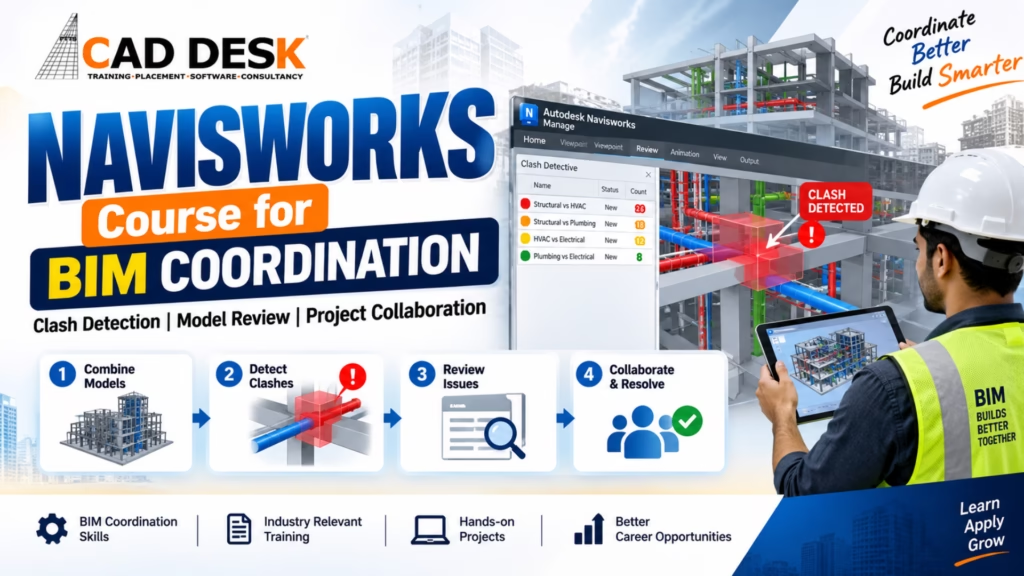
When professionals talk about Navisworks for coordination, Navisworks Manage is particularly relevant because of its clash detection and coordination capabilities.
It can be used to review combined models and support clash-based workflows.
For someone searching for a Navisworks course in Bangalore, it is worth checking whether the training specifically covers Navisworks Manage and not only basic model viewing.
Important learning areas can include:
- Model aggregation
- Navigation
- Selection sets
- Search sets
- Clash detection
- Clash reports
- Viewpoints
- Sectioning
- Measurements
- Model review
- Markups
- Issue communication
- Coordination workflows
The exact course syllabus can vary between training providers.
At CADDESK Bangalore, learners interested in Navisworks can evaluate the training based on how much practical coordination work is included.
Model Review in Navisworks
Clash detection is only one part of Navisworks.
BIM model review is another important activity.
A BIM coordinator may need to examine the model from different angles and investigate specific areas of the building.
For example, you may want to review:
- Plant rooms
- Ceiling spaces
- Service corridors
- Staircases
- Mechanical rooms
- Electrical rooms
- Plumbing areas
- Structural intersections
- Equipment spaces
Navigation tools allow users to move around the model and inspect these areas.
Sectioning can also be useful because it allows the coordinator to look inside the building and understand what is happening between floors, walls and service spaces.
This is why a good Navisworks course in Bangalore should include hands-on model review rather than teaching clash detection alone.
Selection Sets and Search Sets
When working with a large model, selecting individual elements repeatedly can become time-consuming.
Selection sets and search sets can help organize and identify groups of elements.
For example, a coordinator may want to isolate:
- All ducts
- All pipes
- All structural beams
- All columns
- All equipment
- All cable trays
This makes model review more manageable.
Search-based workflows can also help when dealing with large projects.
Understanding these features is useful for anyone taking Navisworks Manage training because coordination work often involves large models rather than small practice files.
How Navisworks Helps Different Teams
One of the biggest strengths of Navisworks is that it supports collaboration between disciplines.
Architects
Architects can review how building spaces interact with structural and MEP systems.
Structural Engineers
Structural teams can identify conflicts involving beams, columns, slabs and other structural components.
MEP Engineers
MEP professionals can review service routes and identify conflicts with architecture and structure.
BIM Coordinators
BIM coordinators bring the different disciplines together, investigate issues and communicate required corrections.
Project Managers
Project managers can use coordinated model information to better understand project progress and potential coordination concerns.
This cross-disciplinary use is one reason why Navisworks training in Bangalore can be relevant to professionals from different AEC backgrounds.
Navisworks for Project Collaboration
A BIM project is rarely completed by one person.
Multiple teams work on the same building, often from different offices or locations.
The coordination process therefore requires clear communication.
Finding a clash is only the beginning.
Someone needs to understand:
- What is wrong?
- Where is the issue?
- Which disciplines are involved?
- Who should correct it?
- What change is required?
- Has the issue been resolved?
A useful BIM coordination course should teach learners to think about this complete process.
Navisworks provides tools that can support viewpoints, clash results and review information so that teams can discuss specific project areas more clearly.
What Does a Navisworks Course Teach?
The syllabus can vary, but a practical Navisworks course in Bangalore should ideally cover the following areas.
Navisworks Interface
Start by understanding the software environment, project browser, navigation and basic controls.
Model Aggregation
Learn how different discipline models can be brought together for coordination.
Model Navigation
Learn how to move through the model, inspect areas and control viewpoints.
Selection and Search
Understand how model elements can be selected and organized.
Clash Detection
Learn how to set up clash tests and interpret results.
Clash Review
Understand how to separate meaningful clashes from acceptable or irrelevant results.
Viewpoints
Learn how to capture important project views for communication.
Sectioning
Use sectioning tools to inspect areas that are difficult to understand from exterior views.
Measurements
Review distances and dimensions when investigating coordination issues.
Coordination Reports
Understand how clash and review information can be communicated to project teams.
Practical Project
Apply everything to a combined architectural, structural and MEP model.
This final step is especially important.
Who Should Learn Navisworks?
Navisworks is not limited to one profession.
It can be useful for:
- Civil engineers
- Architects
- Structural engineers
- MEP engineers
- BIM modelers
- BIM coordinators
- Design professionals
- Construction professionals
- Project engineers
- Site engineers
- BIM freshers
- AEC professionals moving toward BIM
However, the best learning path depends on your background.
Someone with Revit experience may find the transition to Navisworks easier because they already understand BIM models. Someone completely new to BIM may need to learn basic modeling concepts first. A Navisworks course in Bangalore can therefore be especially useful as the next step after learning a modeling platform.
Should You Learn Revit Before Navisworks?
For many beginners, yes.
You do not absolutely have to know Revit before learning Navisworks, but having experience with a BIM modeling tool can make the coordination process easier to understand.
Think of it like this:
Revit or another BIM authoring tool → creates the model
Navisworks → combines, reviews and coordinates the models
The two roles are different.
A person creating the model needs to understand how building elements are modeled. A coordinator needs to understand how those elements interact across disciplines.
This is why many learners follow a progression such as:
Revit → Navisworks → BIM Coordination
A Navisworks course in Bangalore can fit naturally into this learning path.
Navisworks vs Revit
Students often compare these two software platforms.
But they are not direct alternatives.
| Revit | Navisworks |
|---|
| BIM authoring software | Model review and coordination software |
| Used to create building models | Used to combine and review models |
| Modeling-focused | Coordination-focused |
| Creates building elements | Reviews relationships between models |
| Documentation | Clash detection and project review |
| Discipline modeling | Multi-discipline coordination |
A simple way to remember the difference is:
Revit helps create the BIM model.
Navisworks helps coordinate the BIM models.
That distinction is important when choosing a course.
If you are searching for a Navisworks course in Bangalore, you should ideally understand where Navisworks fits into the overall BIM workflow.
Career Opportunities After Navisworks Training
Learning Navisworks alone does not automatically qualify someone for a BIM coordinator position. However, it can become a useful skill within a broader AEC software profile.
Possible roles may include:
- BIM Modeler
- Junior BIM Coordinator
- BIM Engineer
- BIM Coordination Assistant
- Revit Modeler
- MEP BIM Modeler
- Structural BIM Modeler
- Design Coordinator
- BIM Support Professional
Job titles vary between companies.
Employers may also expect knowledge of Revit, discipline-specific modeling, construction drawings and other BIM tools. This is why it is better to think of Navisworks as one part of a BIM career skill set. A practical BIM coordination course can help connect software skills with actual coordination workflows.
What Should You Look for in a Navisworks Course in Bangalore?
There are many training options available, so students should compare courses carefully.
Practical projects
Check whether the course includes actual project models.
Clash detection
Make sure clash detection is taught through practical examples.
Navisworks Manage
Check whether the syllabus covers the tools needed for coordination workflows.
Multi-discipline models
The course should ideally involve architectural, structural and MEP models.
BIM workflow
Do not learn Navisworks in isolation. Understand where it fits within the BIM process.
Trainer experience
A trainer with real project exposure can explain why certain coordination decisions are made.
Portfolio work
A project that you can explain during an interview is more useful than simply completing exercises.
For learners comparing options, CADDESK Bangalore can be considered alongside other institutes based on syllabus, practical training, project exposure and career goals.
Why Choose CADDESK Bangalore for Navisworks Training?
If you are considering a Navisworks course in Bangalore, CADDESK Bangalore can be one of the options to evaluate for BIM-related software training.
The key thing to look for is a practical approach.
Practical BIM Learning
Navisworks becomes easier to understand when you work with actual project-style models instead of only following software demonstrations.
Coordination-Focused Training
The training should help learners understand how models from different disciplines are brought together and reviewed.
Clash Detection Practice
Hands-on clash detection training can help students understand how clashes are identified, reviewed and communicated.
Model Review Skills
Learners can develop an understanding of navigation, viewpoints, sectioning, measurements and model investigation.
Career-Oriented Approach
Navisworks can be combined with Revit and other BIM skills to create a broader profile for AEC-related opportunities.
Before enrolling, students should review the current CADDESK Bangalore syllabus, course duration, project work and training format to make sure they match their individual goals.
Common Mistakes When Learning Navisworks
Mistake 1: Thinking Navisworks Is Only for Clash Detection
Clash detection is important, but model review, visualization, measurement, viewpoints and coordination workflows are also valuable.
Mistake 2: Learning Without Understanding BIM
If you don’t understand how architectural, structural and MEP teams work, software tools alone will not make you a good coordinator.
Mistake 3: Treating Every Clash as a Problem
Software detects geometric relationships. Humans need to decide whether those relationships actually create a construction or coordination issue.
Mistake 4: Avoiding Real Projects
Small exercises are useful at the beginning, but complete projects are necessary to understand coordination.
Mistake 5: Learning Navisworks in Isolation
Combining Navisworks with Revit or other relevant BIM skills can provide a stronger understanding of the overall workflow.
Frequently Asked Questions
What is Navisworks used for in BIM?
Navisworks is used to combine models from different disciplines, review the overall project, detect potential clashes, inspect model information, communicate coordination issues and support project collaboration.
Is Navisworks only used for clash detection?
No. Navisworks can also support model review, navigation, measurements, viewpoints, sectioning, visualization and coordination workflows. Clash detection is one of its most popular uses.
What is Navisworks Manage?
Navisworks Manage is the Navisworks product focused on project review and coordination workflows, including clash detection.
Should I learn Revit before Navisworks?
For many beginners, learning Revit or another BIM modeling platform first can be helpful because it gives you a better understanding of the models you will coordinate in Navisworks.
Who should learn Navisworks?
Civil engineers, architects, structural professionals, MEP professionals, BIM modelers, BIM coordinators and other AEC professionals can benefit from Navisworks knowledge.
Is Navisworks useful for freshers?
Yes, it can be a useful additional BIM skill for freshers, particularly when combined with Revit, construction drawing knowledge and discipline-specific BIM skills.
Is clash detection difficult?
The basic software workflow is manageable, but understanding which clashes actually matter requires construction knowledge and coordination experience.
What should a Navisworks course include?
A practical course should ideally cover model aggregation, navigation, selection and search sets, clash detection, clash review, viewpoints, sectioning, measurements, coordination workflows and project practice.
Can Navisworks help with MEP coordination?
Yes. MEP coordination is one of the common applications of Navisworks because HVAC ducts, pipes, cable trays and equipment often need to be coordinated with architectural and structural elements.
Is Navisworks part of BIM?
Navisworks can be used as part of a BIM coordination workflow. It supports the review and coordination of models produced by different disciplines.
Where can I learn Navisworks in Bangalore?
Students and professionals looking for a Navisworks course in Bangalore can compare training institutes based on practical projects, clash detection training, BIM coordination content, trainer experience and project exposure. CADDESK Bangalore is one option to consider when evaluating BIM software training.