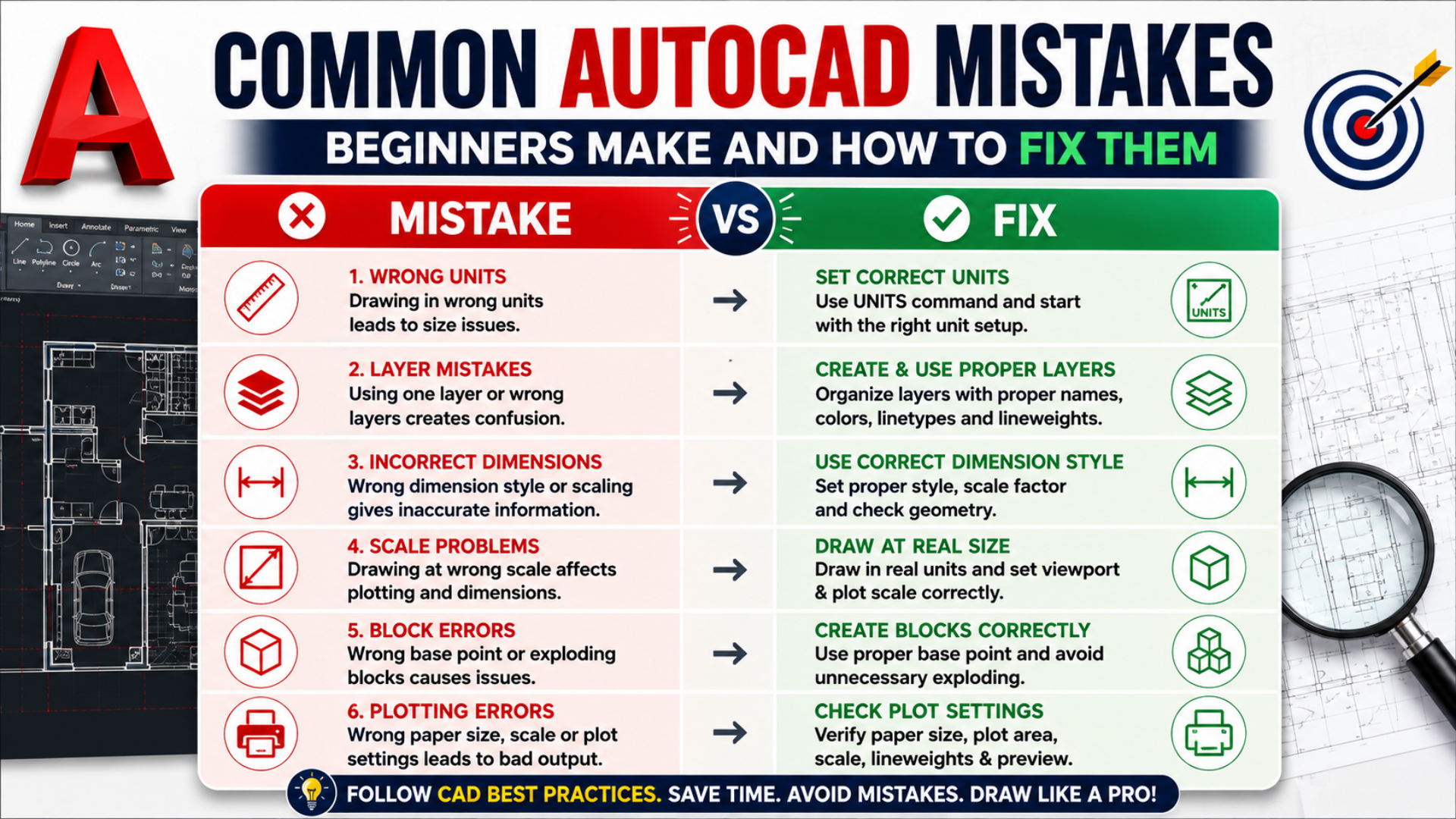
What are the most common AutoCAD mistakes beginners should avoid? The most common AutoCAD mistakes for beginners include incorrect drawing units, poor layer management, wrong dimensions, scale problems, improperly created blocks, inaccurate object snaps, inefficient commands, and plotting errors. Anyone searching for an AutoCAD training institute in Bangalore can avoid many of these issues by learning proper AutoCAD tips, drawing standards, and CAD best practices from the beginning. CADDESK Bangalore can help learners understand these fundamentals through structured AutoCAD training and practical drafting exercises.
AutoCAD can appear simple when beginners first learn basic drawing commands, but an AutoCAD training institute in Bangalore knows that professional drafting requires much more than knowing how to draw lines and circles. Beginners often create technically incorrect drawings because they focus on commands without understanding units, layers, object properties, precision, annotation, scale, and plotting standards.Many AutoCAD mistakes for beginners happen because learners do not establish drawing settings before starting a project. An AutoCAD training institute in Bangalore can teach students to prepare the drawing environment first, including units, layers, limits, object snaps, annotation settings, and other essential controls. Following these CAD best practices can prevent many problems later.The good news is that most beginner errors are easy to identify and correct once the cause is understood. An AutoCAD training institute in Bangalore can help learners develop a troubleshooting mindset: identify what is wrong, determine why it happened, and apply the correct fix instead of repeatedly changing random settings.
1. Mistake: Starting a Drawing Without Setting Units
One of the most common AutoCAD mistakes for beginners is starting a drawing without deciding whether the project will use millimeters, centimeters, meters, inches, or another unit system. An AutoCAD training institute in Bangalore can teach learners that AutoCAD geometry is essentially unit-independent, meaning the user must establish a consistent measurement convention for the project.
For example, if a beginner intends to draw a 5-meter wall but enters 5 while working in a millimeter-based workflow, the resulting geometry may represent 5 mm instead of 5,000 mm. An AutoCAD training institute in Bangalore can demonstrate this type of AutoCAD scale problem through practical drawing exercises.
How to Fix It
Before beginning the drawing, determine the project’s required units and establish them consistently. Use the UNITS command to review the drawing’s unit settings and choose the appropriate format and precision. An AutoCAD training institute in Bangalore can also teach learners to check imported drawings before combining them with their own work.
AutoCAD Tip
Never assume that a drawing received from another person uses the same units as your template. An AutoCAD training institute in Bangalore recommends checking dimensions and known reference objects before continuing with an external drawing.
2. Mistake: Drawing Everything on One Layer
Another major beginner problem is placing walls, dimensions, text, furniture, centerlines, hatches, and other objects on a single layer. An AutoCAD training institute in Bangalore can explain that proper layer organization is one of the most important CAD best practices for creating professional and editable drawings.
Poor layer management creates layer mistakes that become increasingly difficult to correct as the drawing becomes larger. An AutoCAD training institute in Bangalore can teach learners to separate objects according to their function, such as walls, doors, windows, dimensions, text, furniture, electrical elements, structural elements, and hatches.
How to Fix It
Create logical layers before starting the main drawing. Assign suitable names, colors, linetypes, and lineweights according to the project’s drafting standards. An AutoCAD training institute in Bangalore can teach students to use Layer Properties Manager to control visibility, locking, freezing, and other layer settings.
AutoCAD Tip
Avoid creating hundreds of unnecessary layers. An AutoCAD training institute in Bangalore can help learners create a simple, consistent layer structure that is easy to understand and maintain.
3. Mistake: Using the Wrong Layer for Objects
Even when beginners create multiple layers, another common issue is placing objects on the wrong layer. These layer mistakes can cause unexpected colors, lineweights, linetypes, or visibility problems. An AutoCAD training institute in Bangalore can teach learners to check the current layer before creating new geometry.
For example, a dimension accidentally placed on the wall layer may remain visible when the wall layer is frozen or may inherit inappropriate plotting properties. An AutoCAD training institute in Bangalore can demonstrate how these small errors can affect the entire drawing.
How to Fix It
Select the object and change its layer through the Properties palette or Layer controls. An AutoCAD training institute in Bangalore can also teach learners to use MATCHPROP when appropriate to transfer properties from a correctly formatted object.
AutoCAD Tip
Before drawing, confirm the current layer. This simple habit is one of the easiest CAD best practices an AutoCAD training institute in Bangalore can teach beginners.
4. Mistake: Ignoring Object Snaps
Object snaps are essential for accurate drafting, yet beginners often draw without using them correctly. An AutoCAD training institute in Bangalore can explain that relying on visual positioning instead of precise snaps can introduce small errors that become serious when multiple objects are combined.
Common object snaps include Endpoint, Midpoint, Center, Intersection, Perpendicular, Tangent, and Nearest. An AutoCAD training institute in Bangalore can show learners how these tools help them create accurate geometry without manually estimating locations.
How to Fix It
Enable the appropriate Object Snap settings and use temporary object snaps when necessary. An AutoCAD training institute in Bangalore can teach learners to avoid selecting every available snap if it creates unwanted snap behavior.
AutoCAD Tip
Use only the snaps you need for the current task. An AutoCAD training institute in Bangalore can help beginners understand that controlled snapping improves both accuracy and drafting speed.
5. Mistake: Drawing Without Ortho or Polar Tracking
Beginners sometimes create horizontal and vertical lines manually by trying to keep the cursor visually aligned. An AutoCAD training institute in Bangalore can teach that this approach can produce inaccurate geometry, particularly when drawings contain many repeated elements.
Ortho mode and Polar Tracking help maintain controlled directions. An AutoCAD training institute in Bangalore can demonstrate how these tools make it easier to create accurate horizontal, vertical, and angular geometry.
How to Fix It
Use F8 to control Ortho mode when appropriate and configure Polar Tracking for required angles. An AutoCAD training institute in Bangalore can explain when each method is more suitable for a particular drafting task.
AutoCAD Tip
Do not depend on your eyes for precision when AutoCAD provides tools specifically designed to control geometry. This is one of the fundamental CAD best practices taught by an AutoCAD training institute in Bangalore.
6. Mistake: Entering Incorrect Dimensions
Incorrect dimensions are among the most serious AutoCAD mistakes for beginners because dimensions communicate measurable design information. An AutoCAD training institute in Bangalore can teach learners that dimensions should represent the actual geometry rather than being manually typed to display a desired value.
A beginner may draw an object at one size and then modify the dimension text manually to show another measurement. An AutoCAD training institute in Bangalore can explain why this can create misleading documentation and reduce drawing reliability.
How to Fix It
Use associative dimensions where appropriate and verify that dimension values correspond to the actual geometry. An AutoCAD training institute in Bangalore can teach learners to check dimension styles, units, precision, scale factors, and annotation settings.
AutoCAD Tip
Never manually overwrite a dimension simply to make it display the value you expect. An AutoCAD training institute in Bangalore can teach better methods for correcting the underlying geometry or dimension settings.
7. Mistake: Using the Wrong Dimension Style
Even when the geometry is correct, beginners may use inconsistent dimension styles throughout the drawing. An AutoCAD training institute in Bangalore can explain that dimension style controls text height, arrows, units, precision, extension lines, offsets, and other visual properties.
Using different dimension styles without a reason can make a drawing look inconsistent and unprofessional. An AutoCAD training institute in Bangalore can teach learners to create or select appropriate DIMSTYLE settings before dimensioning a project.
How to Fix It
Use the Dimension Style Manager to establish consistent settings. An AutoCAD training institute in Bangalore can teach learners how to modify existing styles and apply them consistently throughout the drawing.
AutoCAD Tip
Create a standard dimension style for frequently used project types. This is an effective CAD best practice recommended by an AutoCAD training institute in Bangalore.
8. Mistake: Drawing at the Wrong Scale
AutoCAD scale problems are among the most frequently encountered issues by beginners. An AutoCAD training institute in Bangalore can explain an important principle: model geometry should generally be created at its intended real-world size, while scale is managed primarily through layouts, viewports, annotation, and plotting workflows.
For example, if a building wall is supposed to be 5 meters long, the model should represent that actual measurement according to the project’s chosen units. An AutoCAD training institute in Bangalore can show learners how incorrect scaling can affect dimensions, blocks, annotations, and printed output.
How to Fix It
First determine whether the problem is in the geometry, the units, the viewport scale, or the plot settings. An AutoCAD training institute in Bangalore can teach learners to diagnose each possibility rather than immediately using SCALE on the entire drawing.
AutoCAD Tip
Before scaling an entire drawing, check a known measurement. This simple diagnostic step can help an AutoCAD training institute in Bangalore identify whether the issue is actually a unit mismatch.
9. Mistake: Scaling Objects Randomly
Beginners sometimes use the SCALE command repeatedly until an object visually appears to have the desired size. An AutoCAD training institute in Bangalore can explain that visual scaling without a known reference can create inaccurate geometry.
This is particularly problematic with imported blocks, furniture, symbols, and external drawings. An AutoCAD training institute in Bangalore can teach learners to use reference-based scaling when the original and required dimensions are known.
How to Fix It
Use the SCALE command with the Reference option when appropriate. An AutoCAD training institute in Bangalore can teach learners to identify a known length in the object, specify the desired length, and allow AutoCAD to calculate the required scale factor.
AutoCAD Tip
Always use a known measurement when correcting an unknown scale. This is safer than estimating the scale visually and is one of the most useful AutoCAD tips taught by an AutoCAD training institute in Bangalore.
10. Mistake: Exploding Everything
The EXPLODE command can be useful, but beginners often use it unnecessarily. An AutoCAD training institute in Bangalore can explain that exploding blocks, polylines, dimensions, or other objects can remove useful relationships and make future editing more difficult.
For example, a block containing multiple objects can be edited or replaced efficiently, while exploded geometry may require individual editing. An AutoCAD training institute in Bangalore can teach learners to preserve object intelligence whenever possible.
How to Fix It
Keep blocks, polylines, dimensions, and other structured objects intact unless there is a specific reason to explode them. An AutoCAD training institute in Bangalore can help learners understand when EXPLODE is appropriate and when it should be avoided.
AutoCAD Tip
Before exploding an object, ask whether you will need to edit, reuse, or update it later. Good CAD best practices prioritize editable drawings, and an AutoCAD training institute in Bangalore can reinforce this mindset.
11. Mistake: Creating Poorly Designed Blocks
Blocks are powerful tools, but poorly created blocks can lead to scale, insertion, and editing problems. An AutoCAD training institute in Bangalore can teach beginners to consider the base point, layer behavior, object properties, and intended insertion units when creating blocks.
A block created without a sensible base point may be difficult to place accurately. An AutoCAD training institute in Bangalore can demonstrate how choosing an appropriate insertion point improves workflow.
How to Fix It
Use the BLOCK command and carefully select a meaningful base point. Check the block’s objects and properties before saving it. An AutoCAD training institute in Bangalore can also teach learners about reusable blocks and when dynamic blocks may provide additional flexibility.
AutoCAD Tip
Create reusable blocks for frequently repeated objects instead of redrawing them manually. This is one of the practical CAD best practices taught at an AutoCAD training institute in Bangalore.
12. Mistake: Using Inconsistent Text Heights
Inconsistent text sizes are another common documentation problem. An AutoCAD training institute in Bangalore can explain that professional drawings should use a clear hierarchy for titles, notes, labels, dimensions, and other annotations.
When beginners manually change text height repeatedly, drawings can quickly become inconsistent. An AutoCAD training institute in Bangalore can teach learners to use appropriate text styles and annotation settings.
How to Fix It
Create standardized text styles and use them consistently. An AutoCAD training institute in Bangalore can show learners how text height and annotation scale interact with layout and plotting workflows.
AutoCAD Tip
Do not adjust every text object individually unless there is a specific design reason. Standardized styles make drawings easier to maintain and are an important part of CAD best practices.
13. Mistake: Ignoring Lineweights
A drawing can have technically correct geometry but still look poor when printed because lineweights have not been managed properly. An AutoCAD training institute in Bangalore can teach learners that lineweight helps communicate visual hierarchy in technical drawings.
For example, major building elements may need stronger visual emphasis than secondary information. An AutoCAD training institute in Bangalore can show how layer-based lineweights can create a consistent plotting result.
How to Fix It
Assign lineweights through layers or appropriate object properties and check the plot preview before printing. An AutoCAD training institute in Bangalore can teach learners how CTB or STB plot style workflows affect printed output.
14. Mistake: Ignoring Linetypes
Another common beginner issue is using continuous lines for everything. An AutoCAD training institute in Bangalore can explain that centerlines, hidden lines, property boundaries, and other drawing elements may require different linetypes according to the applicable drafting standard.
How to Fix It
Load and assign appropriate linetypes through Layer Properties or object properties. An AutoCAD training institute in Bangalore can also explain why linetype scale sometimes causes patterns to appear too dense or too widely spaced.
AutoCAD Tip
If a dashed line appears continuous, do not immediately redraw it. Check the linetype and linetype scale first. This is a useful troubleshooting habit taught by an AutoCAD training institute in Bangalore.
15. Mistake: Not Cleaning the Drawing
Over time, drawings can accumulate unused layers, blocks, linetypes, styles, and other unnecessary data. An AutoCAD training institute in Bangalore can teach beginners that drawing cleanup helps maintain organized project files.
Commands and tools such as PURGE can help remove unused elements when appropriate. An AutoCAD training institute in Bangalore can explain that cleanup should be performed carefully, particularly on shared or referenced files.
AutoCAD Tip
Do not wait until a drawing becomes extremely large before checking its unused content. Regular cleanup is a useful CAD best practice that an AutoCAD training institute in Bangalore can incorporate into project workflows.
16. Mistake: Not Using Layouts and Viewports Correctly
Beginners sometimes create multiple copies of a model at different sizes simply because they do not understand layouts and viewports. An AutoCAD training institute in Bangalore can teach that model space and paper space serve different purposes in a professional drawing workflow.
Model space is generally used for creating the actual design geometry, while layouts can organize sheets, title blocks, viewports, annotations, and plotting information. An AutoCAD training institute in Bangalore can demonstrate how this workflow reduces unnecessary duplication.
How to Fix It
Create the model at the appropriate real-world size and use layouts and viewport scales for sheet presentation. An AutoCAD training institute in Bangalore can teach learners to lock viewport scales after setting them correctly.
17. Mistake: Printing Without Checking Plot Preview
Plotting errors are among the most frustrating AutoCAD mistakes for beginners because a drawing may look perfect on screen but produce an incorrect printed or PDF output. An AutoCAD training institute in Bangalore can teach learners to always check the plot setup and preview before final output.
Common plotting errors include missing objects, incorrect paper size, wrong orientation, incorrect plot area, inappropriate scale, missing lineweights, and unexpected colors. An AutoCAD training institute in Bangalore can help learners develop a systematic approach to diagnosing these problems.
How to Fix It
Check the printer or PDF configuration, paper size, plot area, plot scale, orientation, plot style, and lineweight settings. An AutoCAD training institute in Bangalore can recommend using Preview before committing to the final output.
AutoCAD Tip
Never assume that “looks correct on screen” means “will print correctly.” Plot preview is one of the simplest and most valuable AutoCAD tips an AutoCAD training institute in Bangalore can teach.
18. Mistake: Choosing the Wrong Plot Area
Beginners may select Display, Extents, Limits, or Window without understanding how each option affects the output. An AutoCAD training institute in Bangalore can teach learners to choose the plot area based on the intended sheet and drawing workflow.
For a specific drawing sheet, Window or Layout-based plotting may be more appropriate than simply selecting Extents. An AutoCAD training institute in Bangalore can demonstrate the difference using practical examples.
How to Fix It
Identify exactly what needs to appear on the sheet and configure the plot area accordingly. An AutoCAD training institute in Bangalore can teach learners to use layouts and title blocks for repeatable plotting workflows.
19. Mistake: Not Saving Frequently or Creating Versions
A technical drawing can contain hours of work, so losing progress can be extremely frustrating. An AutoCAD training institute in Bangalore can teach beginners to develop reliable file-saving habits as part of their overall CAD best practices.
Beginners may accidentally overwrite files, close drawings without saving, or make major changes without keeping a previous version. An AutoCAD training institute in Bangalore can encourage organized project folders and sensible file naming.
How to Fix It
Save regularly, use meaningful file names, and maintain appropriate project versions when required. An AutoCAD training institute in Bangalore can also teach learners to understand AutoCAD’s automatic recovery and backup features without relying on them as the only protection.
20. Mistake: Using Too Many Commands Manually
Beginners sometimes spend excessive time navigating menus and repeating individual commands. An AutoCAD training institute in Bangalore can help learners improve efficiency by learning keyboard shortcuts, command aliases, grips, object selection methods, and reusable workflows.
For example, repeatedly drawing similar objects manually can increase both drafting time and the chance of errors. An AutoCAD training institute in Bangalore can teach tools such as COPY, ARRAY, OFFSET, MATCHPROP, and other productivity commands where appropriate.
AutoCAD Tip
The objective is not simply to know more commands. The objective is to choose the right command for the task. This is one of the most valuable AutoCAD tips for beginners learning at an AutoCAD training institute in Bangalore.
When something goes wrong in AutoCAD, beginners often start changing multiple settings at once. An AutoCAD training institute in Bangalore can teach a better troubleshooting method: first identify the visible problem, then determine which category it belongs to, and finally change only the relevant setting.For example, if a dimension looks incorrect, an AutoCAD training institute in Bangalore can guide learners to check the actual geometry, units, dimension style, scale factor, and annotation settings rather than randomly modifying the drawing.
A useful troubleshooting sequence for AutoCAD mistakes for beginners is: Check Units → Check Layers → Check Object Properties → Check Geometry → Check Scale → Check Annotation → Check Layout → Check Plot Settings. An AutoCAD training institute in Bangalore can use this sequence as a practical checklist for everyday drafting problems.
One of the biggest advantages of learning through an AutoCAD training institute in Bangalore is developing good habits from the beginning rather than correcting poor habits later. CAD best practices include consistent units, organized layers, accurate object snaps, proper dimensions, reusable blocks, standardized text, controlled lineweights, clean drawings, and reliable plotting procedures.Beginners should also maintain their drawings logically. An AutoCAD training institute in Bangalore can teach learners to keep geometry organized, avoid unnecessary duplication, use meaningful layer names, preserve reusable objects, and review drawings before delivery.Accuracy should always come before speed. An AutoCAD training institute in Bangalore can help learners gradually increase drafting speed after they understand precision tools and workflows. A fast drawing that contains errors can require more time to correct than a carefully created drawing.
Before submitting an AutoCAD drawing, an AutoCAD training institute in Bangalore can recommend checking the following:
Following this checklist can help learners catch many AutoCAD mistakes for beginners before the drawing reaches a client, consultant, instructor, or project team. An AutoCAD training institute in Bangalore can turn this checklist into a regular quality-control routine.
Reading about AutoCAD commands is useful, but practical application is essential for developing reliable drafting skills. An AutoCAD training institute in Bangalore can provide opportunities to practice drawing creation, editing, annotation, layer management, scaling, blocks, layouts, and plotting through realistic exercises.A beginner may understand the definition of an AutoCAD scale problem but still struggle to identify whether the problem comes from drawing units, imported geometry, viewport scale, or plot settings. An AutoCAD training institute in Bangalore can help learners solve these issues by working through practical troubleshooting scenarios.Project-based practice also helps learners understand how different AutoCAD features interact. An AutoCAD training institute in Bangalore can demonstrate that changing a layer can affect visibility and plotting, while changing scale can affect annotation and presentation. This connected understanding is more valuable than memorizing isolated commands.
Choosing an AutoCAD training institute in Bangalore can be an important step for beginners who want to develop accurate and organized drafting skills. CADDESK Bangalore can be considered by learners looking for structured AutoCAD training focused on fundamental commands, drafting practices, layers, dimensions, blocks, layouts, scaling, and plotting.For students struggling with AutoCAD mistakes for beginners, practical guidance can make troubleshooting easier. An AutoCAD training institute in Bangalore such as CADDESK Bangalore can help learners understand not only how to use commands but also how to identify and correct common drafting problems.The objective of AutoCAD training institute in Bangalore programs should be to help learners build dependable drafting habits that can be applied across different projects. CADDESK Bangalore can support learners who want to strengthen their AutoCAD fundamentals and understand professional CAD best practices.
1. What are the most common AutoCAD mistakes beginners make?
Common AutoCAD mistakes for beginners include incorrect units, poor layer management, inaccurate dimensions, wrong drawing scale, improper blocks, incorrect object snaps, inconsistent text, and plotting errors. An AutoCAD training institute in Bangalore can help beginners identify and avoid these issues through practical training.
2. How can I fix AutoCAD scale problems?
First, check the drawing units and measure a known object to identify whether the geometry is at the correct size. Then check viewport and plot scales before using the SCALE command. An AutoCAD training institute in Bangalore can teach beginners how to diagnose different AutoCAD scale problems systematically.
3. Why are my AutoCAD dimensions incorrect?
Incorrect dimensions can result from wrong units, dimension styles, scale factors, or inaccurate geometry. An AutoCAD training institute in Bangalore can teach learners to verify the actual geometry and dimension settings instead of manually changing dimension values.
4. How do I avoid layer mistakes in AutoCAD?
Create logical layers before starting the drawing and assign objects to the correct layers. Use consistent names, colors, linetypes, and lineweights. An AutoCAD training institute in Bangalore can teach these layer-management techniques as part of professional CAD best practices.
5. Why do my dashed lines appear as continuous lines?
This can happen because of incorrect linetype settings or linetype scale. Check the assigned linetype and adjust the appropriate scale settings. An AutoCAD training institute in Bangalore can help beginners troubleshoot linetype display problems.
6. Why does my AutoCAD drawing look correct but print incorrectly?
Common plotting errors include incorrect paper size, plot area, scale, orientation, plot style, or lineweight settings. An AutoCAD training institute in Bangalore can teach learners to use Plot Preview and verify settings before creating the final PDF or print.
7. Should I draw everything on one layer in AutoCAD?
No. Separating objects into logical layers makes drawings easier to edit, control, and plot. An AutoCAD training institute in Bangalore can teach beginners how to create an organized layer structure based on the type of drawing.
8. Should beginners use blocks in AutoCAD?
Yes. Blocks are useful for frequently repeated objects such as doors, windows, furniture, symbols, and equipment. An AutoCAD training institute in Bangalore can teach beginners how to create, insert, scale, and manage reusable blocks properly.
9. Why should I avoid exploding blocks unnecessarily?
Exploding a block can remove its reusable structure and make future editing more difficult. An AutoCAD training institute in Bangalore can teach learners when to preserve blocks and when using EXPLODE is appropriate.
10. What are the best AutoCAD tips for beginners?
Important AutoCAD tips include setting units before drawing, using Object Snaps, organizing layers, drawing at the correct real-world size, using consistent dimension and text styles, creating reusable blocks, checking layouts, and previewing drawings before plotting. An AutoCAD training institute in Bangalore can help beginners develop these habits through practice.
11. Why are Object Snaps important in AutoCAD?
Object Snaps help you select exact geometric points such as endpoints, midpoints, centers, and intersections. An AutoCAD training institute in Bangalore can teach beginners to use Object Snaps correctly for accurate drafting.
12. How can I improve my AutoCAD drafting accuracy?
Use Object Snaps, Ortho, Polar Tracking, accurate dimensions, appropriate units, and proper layer organization. An AutoCAD training institute in Bangalore can help learners combine these tools into reliable CAD best practices.
13. Is AutoCAD difficult for beginners?
AutoCAD can be learned progressively when beginners start with basic commands and gradually move into layers, dimensions, blocks, layouts, and plotting. An AutoCAD training institute in Bangalore can provide structured practice to make the learning process easier.
14. What should I check before submitting an AutoCAD drawing?
Check units, geometry, layers, dimensions, blocks, text, linetypes, lineweights, viewport scales, layouts, title blocks, plot settings, and the final preview. An AutoCAD training institute in Bangalore can provide a quality-control checklist to help learners identify common errors.
15. Why choose CADDESK Bangalore for AutoCAD training?
CADDESK Bangalore can be considered by learners looking for an AutoCAD training institute in Bangalore that focuses on drafting fundamentals, practical projects, troubleshooting, scaling, layers, dimensions, blocks, layouts, and plotting. This approach can help beginners build stronger AutoCAD skills and follow professional CAD best practices.
AutoCAD mistakes for beginners are often caused by a few fundamental issues: incorrect units, poorly managed layers, inaccurate dimensions, scale problems, inefficient blocks, weak precision controls, and plotting errors. An AutoCAD training institute in Bangalore can help learners avoid these problems by teaching a structured drafting workflow from the beginning.The most important AutoCAD tips are simple: establish units before drawing, organize layers, use Object Snaps, maintain accurate dimensions, draw at the correct real-world size, use blocks intelligently, manage layouts and viewports properly, and always check the final plot. An AutoCAD training institute in Bangalore can turn these habits into a repeatable professional workflow.When troubleshooting AutoCAD scale problems, layer mistakes, or plotting errors, do not immediately change everything in the drawing. An AutoCAD training institute in Bangalore can teach learners to diagnose the problem systematically by checking units, geometry, object properties, scale, annotation, layout, and plot settings.Ultimately, learning AutoCAD is not just about memorizing commands. It is about creating accurate, organized, editable, and printable technical drawings. An AutoCAD training institute in Bangalore such as CADDESK Bangalore can provide a structured environment for developing these skills through practice and project-based learning.Whether you are completely new to AutoCAD or returning to drafting after a gap, understanding common AutoCAD mistakes for beginners can save time and prevent avoidable errors. With consistent practice, the right AutoCAD tips, and strong CAD best practices, learners can become more confident and efficient in their drafting workflow through an AutoCAD training institute in Bangalore.

Trends in Interior Designing Certainly! Here are some current trends in interior design: Remember that trends in interior design are constantly evolving, and personal preferences
Top Trends in Structural Engineering Certainly! Here are some of the top trends in structural engineering: These trends reflect the ongoing advancements and innovations in
Career Hierarchy Of Interior Designer The career hierarchy of an interior designer typically varies across organizations and countries, but here is a general outline of
New Trends In An Architecture Field New Trends in the Architecture Field The field of architecture is continuously evolving as new technologies, design philosophies, and
New Trends In Mechanical Engineering here are some new trends in mechanical engineering: Keep in mind that the field of mechanical engineering is constantly evolving,
Roadmap to learn softwares interior designing By Caddesk marathahalli in india To learn software for interior designing at Caddesk Marathahalli in India, you can follow
Few Facts About Electrical Engineering Sure, here are a few facts about electrical engineering: Here are some more interesting facts about electrical engineering: Electrical engineering
Top 10 interior Designing interview questions Here are 10 top interior designing interview questions and answers: This question is designed to get a sense of
Top 5 Lumion Interview Questions Sure, here are 10 top Lumion interview questions with answers: Lumion is a real-time 3D rendering software that allows users
Top 10 primavera Interview Questions Certainly! Below are the top 10 Primavera interview questions along with their answers: 1. What is Primavera P6, and what


Top 10 Enscape Interview Questions 1. What is Enscape, and what is its primary purpose? Answer: Enscape is a real-time rendering and visualization plugin
Top 25 3DSMAX Interview Questions Certainly! Below are the top 25 3DS Max interview questions and answers: Remember, it’s essential to understand these concepts thoroughly
Complete Roadmap For Interior Design Course And Appropriate Softwares in 6 Months By Caddesk Marathahalli Roadmap for Interior Design Course at Caddesk Marathahalli (6 Months):
Top 15 Google Sketchup Interview Questioms Here are 15 top Google Sketchup interview questions and answers: Geo-modeling is the process of creating 3D models of